Access Control and Sign-On in Healthcare Software
 Zain QayyumLast Updated: Nov 23, 2026
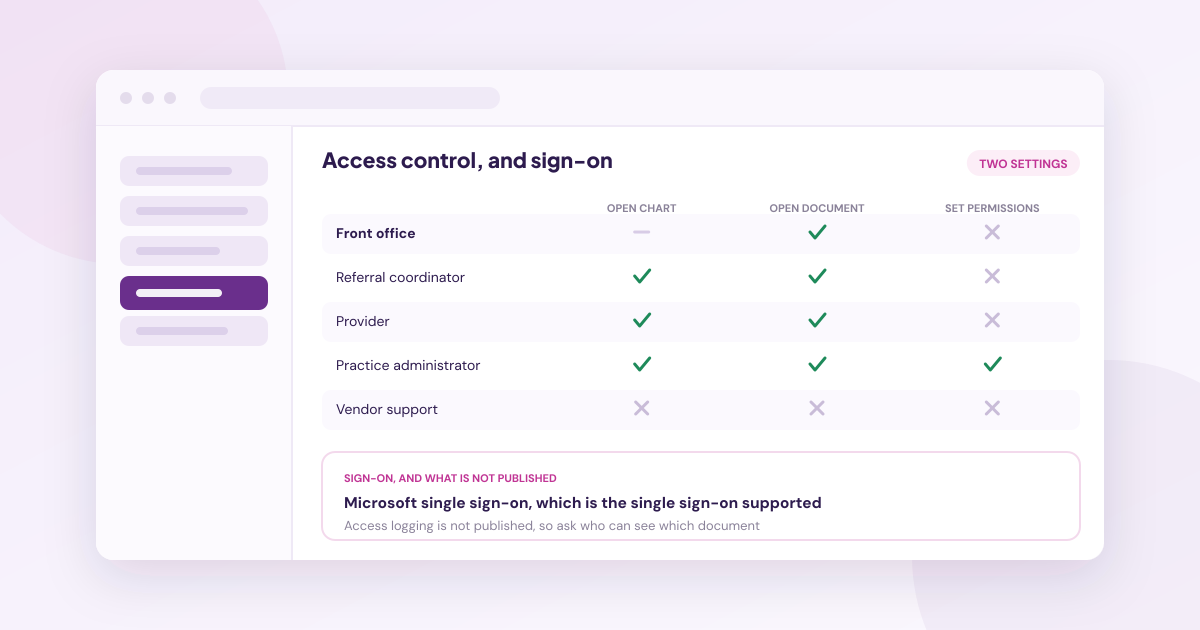
Access Control and Sign-On in Healthcare SoftwareAccess control is the setting that decides which staff member can open which patient chart and which incoming document. In Medsender it is handled through role-based user permissions, set by a practice administrator. Sign-on is handled through Microsoft single sign-on (SSO), which is the single sign-on Medsender supports.
Everything below answers one questionnaire line at a time. Each answer stands on its own, so a single one can be pasted into a security review without the rest of the page. Where nothing is published, this page says so plainly rather than filling the gap.
What Is Role-Based Access Control in Healthcare Software?
Role-based access control (RBAC) is a model that grants permissions to a job role rather than to an individual, so a new receptionist inherits the receptionist permissions on day one. Healthcare software uses it because the alternative, hand-built permissions per person, drifts within weeks of the first staffing change. In Medsender the equivalent is called role-based user permissions, and that is the wording to use on a questionnaire, because it describes what the product actually offers. Most security questionnaires ask for the model by name, so knowing both terms saves a round trip.
Does Medsender Offer Role-Based Access to Patient Records?
Yes. Role-based user permissions are supported, and they govern which staff member can open which patient chart and which incoming document. Permissions follow the role a person holds at the practice, so a front office user and a referral coordinator see different things when they log in. Configuration happens inside the account rather than through a support request, which means a change takes effect the same morning somebody's duties change. On a questionnaire, write role-based user permissions rather than any other phrase. Audit the role list once a term rather than only when somebody complains.
Who Sets Permissions for Each Staff Member?
A practice administrator sets them, inside the Medsender account, without involving the vendor. That matters for two practical reasons. Permissions change on the day somebody changes role rather than on the day a support request is answered, and the person making the change works at the practice and knows what the role actually does. Decide early who holds the administrator account and name a second person as cover, because a single holder on annual leave becomes a bottleneck at the wrong moment. Write that decision down, because cover only works if somebody else knows about it.
Can a Part-Time or Temporary User Be Given Limited Access?
Yes. Give a part-time or temporary user the role that matches the work rather than a copy of a full-time colleague's access, which is the shortcut security questionnaires are written to catch. Role-based user permissions make that a role assignment rather than a custom build. Diary the end date when you create the account, because an assignment that quietly lapses is how access outlives employment. Locum cover and holiday cover deserve the same treatment as a permanent hire. A role with the right limits is also easier to explain than a one-off set of ticks.
Does Role-Based Access Satisfy HIPAA's Minimum Necessary Standard?
Not on its own. The Health Insurance Portability and Accountability Act (HIPAA) requires that access to protected health information (PHI) be limited to the minimum necessary for the job, and software can only give you the means to do that. Satisfying the standard is the practice's own configuration decision, made when somebody chooses which role sees which document. Role-based user permissions are the mechanism, and your own role design is the compliance work. Review that design once a year, because duties drift faster than documentation does.
Which Practice Software Supports Microsoft Single Sign-On?
Medsender supports Microsoft single sign-on, which is the single sign-on Medsender supports. For a practice already running Microsoft accounts for email and files, staff sign in with credentials they already hold rather than another password to reset. Confirm with the vendor which Microsoft account types your own setup uses, and get the answer in writing before you put it on a security questionnaire, because setups differ between practices. A written answer is worth more than a verbal one, since this line reappears on every review you fill in afterwards.
What If Our Practice Does Not Use Microsoft for Sign-On?
Microsoft single sign-on is what Medsender supports, so raise your own setup with the vendor and ask directly what it means for your practice. That is the whole answer, and a page that went further would be inventing a capability. Staff can still be given individual accounts with role-based user permissions, set by a practice administrator, which is how access is controlled either way. Ask the question before the demo rather than after the quote, because it belongs on a shortlist. Keep the vendor's written reply with your other diligence answers.
How Do We Remove Someone's Access When They Leave the Practice?
A practice administrator removes the user inside the Medsender account. Treat that as a step on your own leaver checklist rather than something that happens by itself, and give the step an owner by name rather than by role. Nothing is published about automated provisioning, automated removal or directory synchronisation, so never assume any of those, and ask the vendor in writing if your own process depends on one. Ask too what happens to documents the person had open or in progress, because a checklist usually misses that part.
What Should a Practice Ask a Vendor About Access Logging?
Ask for it in writing, and ask for four specifics. What each log entry records, whether an entry shows which staff member opened a given document, who inside the practice can read the log, and how far back it reaches. Medsender publishes nothing about access logging, so treat the question as open until the vendor answers it on paper. A vendor's willingness to put the detail on paper is itself part of what you learn. Treat the absence of a published answer as neutral rather than as negative.
Where Does Medsender Store Patient Documents?
On Google Cloud, on US servers, reached through a browser with no on-premise option. Medsender is HIPAA compliant and includes a business associate agreement (BAA) free with every account. Encryption is 256-bit Secure Sockets Layer (SSL) in transit and 2048-bit at rest. For independent assurance, System and Organization Controls (SOC) 2 Type II applies, where controls are tested continuously by an independent third party and the report comes through the Trust Center on request. Nothing in that list is an on-premise option, so a practice whose policy requires local hosting should stop here.
Related Reading
Our guide to what SOC 2 Type II means covers what that report proves and what it leaves out. One vendor for fax, referrals and calls covers what consolidating does to an access list. Integration cost and import covers the money questions, and where to start automating practice admin work ranks the jobs themselves.

Zain Qayyum
Co-Founder and Co-CEO
Zain Qayyum is co-founder and co-CEO of Medsender. His work centres on the front-office problems that decide whether a referred patient is ever seen: inbound fax, referral backlogs, and phones nobody has time to answer. He argues that healthcare's hardest problems are operational rather than technical, and speaks and writes on where AI genuinely helps a practice and where it overpromises. He is based in New York.
Related Signals