
Connecting Fax and Referral Software to Your EHR: What IT Actually Has to Do
 Zain QayyumLast Updated: Sep 29, 2026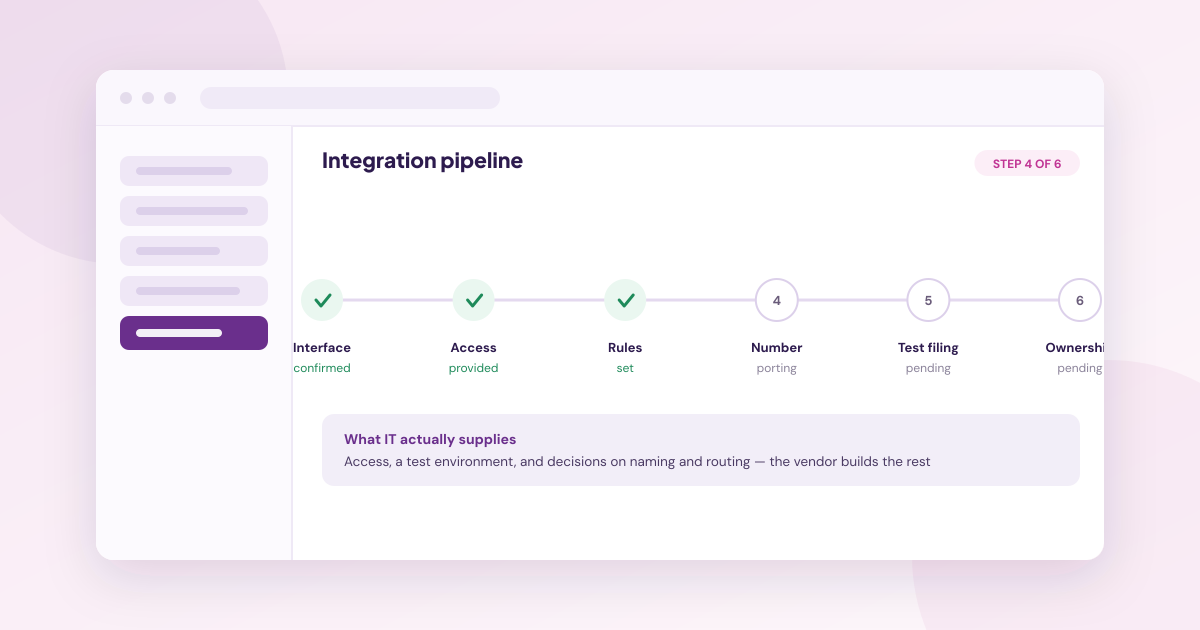
TL;DR
- Most of what IT contributes is access, a test environment and decisions on naming and routing, not engineering work.
- Four interface types are in common use, and which one you get changes the timeline.
- Read access is straightforward; write-back is where electronic health record (EHR) differences appear.
- Porting the fax number is usually the longest single step, so ask for its timeline separately from the integration's.
- Establish who owns the connection when the EHR vendor ships an update.
- Ask whether integration is included in the price or quoted as a project.
Connecting fax and referral software to an EHR means establishing how documents are matched to patients and written back. For most practices the vendor builds it, and IT supplies access, a test environment and decisions about routing, naming and permissions.
Step 1: Establish Which Interface You Are Getting
Four types are in common use, and they are not equivalent. A prebuilt named integration, where the vendor has already built and documented a connection to your system. A marketplace application listed by the EHR vendor, which has been reviewed by somebody other than the seller. A standards-based interface using HL7 version 2 messaging or Fast Healthcare Interoperability Resources (FHIR). Or a custom build against a general application programming interface (API).
The order above is roughly the order of decreasing certainty and increasing timeline. A prebuilt integration is closer to configuration; a custom build is a project with its own testing and maintenance obligations.
Ask which one applies to your system specifically. Medsender lists 35 named EHR integrations as available with 46 more on request, and 24 of the available ones carry a dedicated page. Being on the named list rather than the on-request list is the difference this step is trying to establish.
Step 2: Decide What Write-Back Means for Your System
Reading from the EHR to match a document to a patient is generally the easier half. Writing the result back is where systems diverge, and the honest vendors say so.
Medsender states the condition on its referral management page: "If your EHR supports chart creation and write-back, both happen automatically." Where an EHR does not support it, the document is filed rather than the chart created.
The practical question for IT is which of three outcomes your system will produce: a new chart created automatically, a document filed to an existing chart, or a task raised for staff to complete. Establish this before go-live, because it determines what the front office actually has to do each morning.
Step 3: Supply Access, a Test Environment and Decisions
Step 3 is the bulk of what IT contributes, and it is less than most teams expect. Credentials or interface access to the systems involved. A test or sandbox environment where filing can be verified without touching live records. And decisions that are yours to make, not the vendor's.
Those decisions cover document naming conventions per document type, routing rules for who sees what, role-based permissions for who can override, and which document types require review before filing. None of it is engineering, and all of it determines whether staff can find a document six months later.
Medsender states that its team handles the integration end to end, with guided onboarding. Confirm the equivalent division of labour with any vendor instead of assuming it.
Step 4: Port the Fax Number, and Plan for the Window
Porting is usually the longest step in the whole project, and it is the one most likely to affect patients. Referring providers have your number stored and will keep using it regardless of what you tell them, so porting not replacing is the only switch that stays invisible.
Medsender states plainly on its fax and document automation page: "We port your existing number so nothing changes on your end," and handles the transfer itself.
Ask two things IT will need to answer for the practice: how long the port is expected to take, and what happens to documents arriving during the cutover window.
Step 5: Test Filing Before You Test Volume
Run a small set of real document types through the connection and check where each lands. Referrals, lab results, records requests and one junk fax, because misclassification of the last one is easier to spot in a test than in production.
Check three things for each: the patient matched correctly, the document named according to your convention, and the action visible in the audit log with attribution. Only then increase volume.
Step 6: Agree Who Owns the Connection Afterwards
EHR vendors ship updates, and connections break. Establish before signing who monitors the interface, who a practice calls when a document stops filing, and what the response commitment is.
A marketplace listing helps here, because it implies the EHR vendor has reviewed the integration and has a relationship with its builder. Medsender is listed on the ModMed Marketplace, which is the kind of corroboration worth looking for on your own system's marketplace.
What Usually Costs More Than Expected
Integration work quoted as a separate project. It is the line item practices most often miss, and it can exceed the first year of subscription.
Medsender states that in most cases there are no additional integration fees, with a clear breakdown for larger or customised implementations. Ask every vendor the same question before the discount conversation.
Deciding Whether You Are Ready to Start
Most integrations that run long do not fail on the technical work. They stall because a decision the practice owns was not made before the project started.
- Someone clinical has to decide what write-back means here, which document types go to the chart automatically and which wait for a person. That decision cannot be delegated to the vendor.
- Someone has to be free to supply credentials, a test environment and answers within days rather than weeks, because vendor teams schedule around the practice and lose the slot when it is not used.
- Someone has to own the connection after go-live, including the morning an EHR update changes something and filing quietly stops.
Two things are consistent across these projects. The port is usually the longest step and the least technical, and practices that begin it on day one finish ahead of practices that treat it as the last task. And the cutover window, when documents are arriving against two configurations, is where filing errors cluster, which is why testing a handful of documents end to end matters more than testing volume.
If you can name the clinical owner, the technical contact and the person who handles the first update after go-live, you are ready to start. If you cannot name all three, settling that is worth more than any question you could ask a vendor this week.
FAQs
What Does IT Actually Have to Do for an EHR Integration?
Supply access to the systems involved, provide a test environment, and make decisions about document naming, routing rules and permissions. Most vendors build and maintain the connection themselves, so the engineering is rarely the practice's job. Medsender states its team handles the integration end to end, with guided onboarding.
How Long Does Connecting Fax Software to an EHR Take?
A prebuilt named integration is closer to configuration than to a project. A custom build against a general API takes considerably longer. In practice, porting the fax number is usually the longest single step, so ask for its timeline separately from the integration timeline.
What Is the Difference Between Read and Write-Back?
Reading matches an incoming document to the right patient. Write-back updates the record, either filing the document or creating the chart. Medsender states that where an EHR supports chart creation and write-back, both happen automatically, and files the document where the system does not support it.
Can We Keep Our Fax Number?
Yes, and you should. Referring providers have it stored and will keep using it regardless of notice. Medsender states it ports your existing number so nothing changes on your end, and handles the transfer. Ask what happens to documents arriving during the cutover window.
What Should We Test Before Going Live?
Run real examples of each document type, including one junk fax, and check three things each time: the patient matched correctly, the document named to your convention, and the action visible in the audit log with attribution. Increase volume only after all three hold.
Who Maintains the Integration Afterwards?
In practice it is shared, and the split is what needs writing down. The vendor monitors the interface and repairs it; the practice notices first, because staff see documents stop appearing before any dashboard does. Ask which named person at the practice raises that, what the vendor's response commitment is in hours, and whether repairs after an EHR update are billable or covered.

Zain Qayyum
Chief Executive Officer
Zain Qayyum is co-founder and co-CEO of Medsender. He started the company in 2015 and has spent the decade since on the front-office work that decides whether a referred patient is ever seen: inbound fax, referral backlogs, and phones nobody has time to answer. He argues that healthcare's hardest problems are operational rather than technical, and speaks and writes on where AI genuinely helps a practice and where it overpromises. He is based in New York.
Related Signals
How to Vet a Healthcare AI Vendor: BAA, Trust Center and Audit Trail
Zain QayyumTue, Sep 15, 2026
How to Verify and Override What Healthcare AI Does to a Patient Chart
Zain QayyumTue, Sep 8, 2026
Agentic AI in Healthcare Administration: Scope, Limits and Disclosure
Zain QayyumThu, Aug 6, 2026