Filing Faxes to the Chart, and What Your EHR Has to Support
 Zain QayyumLast Updated: Nov 23, 2026
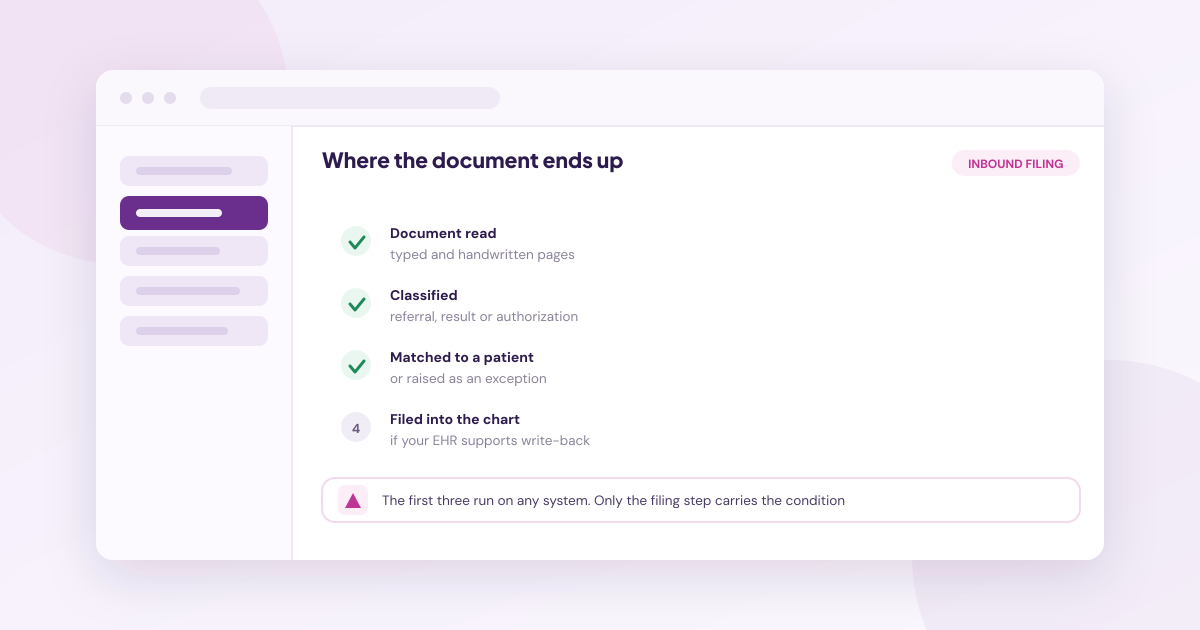
Filing Faxes to the Chart, and What Your EHR Has to SupportFiling faxes to the chart means an inbound document is read, matched to a patient and left where the clinical team looks for it. Whether your electronic health record (EHR) takes the document automatically is the condition, because chart creation and write-back happen if your EHR supports them. Every answer below repeats the rule in full.
Can Software File Faxes to the Chart Automatically?
Software files faxes to the chart automatically if your EHR supports chart creation and write-back, and only partly otherwise. Partly means the receiving, the reading, the classification, the patient matching and the routing all still run, and a person completes the last step by putting the document into the chart. Medsender lists 34 named EHR integrations with 47 more available on request, so the first thing to settle is which list your own system sits on.
The practical test is not the logo on an integrations page. Ask your EHR vendor in writing which operations an outside system may perform, reading and writing, then put the same question to the fax vendor about the same system. Two written answers settle the question before a demo does.
Can Fax Automation Create a Patient Chart Automatically?
Fax automation can create a patient chart automatically if your EHR supports chart creation and write-back, and nobody should state that as a universal capability. A new chart is opened from an incoming document only if your EHR supports those two operations. Where it does not, the fax is matched as far as the printed details allow and then routed to a person who opens the chart, so nothing is created silently.
The verb matters more than the brochure does. Reading a document and writing a record are separate permissions in most systems, and a vendor can hold one without the other. Ask which of the two your interface grants, because an integration that only reads still leaves the filing click with your front office.
Duplicate records are the failure mode worth asking about, because a document carrying a mistyped name can look like a patient nobody has seen before. Anything unusual is flagged as an exception for the coordinator instead, and a new chart is opened only if your EHR supports chart creation and write-back. Ask how a near-duplicate is detected before anything is opened.
What Happens If Your EHR Does Not Support Chart Creation and Write-Back?
Chart creation and write-back happen if your EHR supports them, and this answer describes the case where they are not supported. Five steps keep running unchanged, which are receiving the fax, reading it, classifying it, routing it and handling exceptions. Putting the document into the chart becomes the manual step, a drag and drop rather than a retype, because none of those five steps writes anything into your system.
Sorting and searching account for most of the clock time in a fax inbox, and both run regardless of what the integration allows. Three lines summarise the split for an evaluation.
- Still automatic: receiving, reading, classifying, routing, exception handling
- Now manual: putting the document into the chart
- Worth having either way: a searchable record by patient, sender and date
Decide the split with your own figures before signing anything. Time how long the front office spends sorting and searching the fax inbox across 5 working days, then time the filing clicks on their own. The first figure is the one software takes away even where the integration cannot write.
What Practice Software Replaces Printing Faxes to PDF?
Practice software replaces printing faxes to PDF by doing the job the habit does, which is reading the page on arrival, deciding what it is, naming it and keeping it findable. Medsender reads the page, classifies it and routes it to the queue that owns it, then keeps it searchable by patient, sender and date. Medsender runs in the browser only with no on-premise install, which is the practical difference from a desktop scanning routine.
The print-and-scan loop survives because somebody has to read the page, decide what it is, give it a name and put it somewhere, which is a general pattern here rather than something measured. A named file in a shared folder also loses the arrival date, the one field nobody types and every records request asks for. Medsender is hosted on Google Cloud with United States servers, so nothing sits on the front office machines.
How Does Fax Automation Know Which Patient a Fax Belongs To?
Fax automation works out which patient a fax belongs to by reading the page and looking the printed identifiers up against the records the practice already holds. Optical character recognition (OCR) reads the page and a classification step decides what kind of document it is, and in Medsender's own words the artificial intelligence (AI) knows a referral from a result from an authorization. A confident match routes the document, and anything the software cannot place confidently becomes an exception rather than a guess.
Medsender reads a fax batch in under 5 seconds, and the reading covers both typed and handwritten pages. Where the match succeeds, the document is filed automatically if your EHR supports chart creation and write-back. Ask any vendor where the confidence threshold sits and who in your practice is allowed to move it.
Does Fax Automation Read Handwritten Faxes?
Fax automation reads handwritten faxes, and Medsender's optical character recognition reads typed and handwritten pages alike. Handwriting support matters in a category that mostly assumes clean digital output from a sending system. Reading a page is not the same as being certain about it, so low-confidence output is flagged as an exception for the coordinator and a hard-to-read referral waits for a person.
Handwritten material turns up on referral forms, on order sheets and in the margin of a cover page where a sender adds a note by hand after printing. The reading step covers those marks, and the classification step still has to decide what the document is. Where the two disagree, the coordinator gets the page.
Handwriting arrives differently across the six specialties Medsender names, which are Dermatology, ear, nose and throat (ENT), Gastroenterology, Ophthalmology, Orthopedics and Primary Care. A hand-drawn mark on a dermatology referral and a scrawled laterality note on an orthopedic order are both read, and both can still be flagged. Send a vendor your own hardest page during the evaluation rather than a clean sample.
What Happens to a Fax the Software Cannot Match?
A fax the software cannot match is flagged as an exception for the coordinator, and judgment calls stay with the team. Anything unusual goes to that same queue, so a document the software cannot place is held rather than filed to the nearest guess. The exception queue is a feature and not a defect, and every vendor on a shortlist should be asked in writing what theirs does with a page it cannot place.
Name the owner of that queue before going live, because an unowned queue is the same as no queue. A page carrying two patient names, a cover sheet with no name at all, and a result for somebody who has never been seen are three shapes that turn up often. None of them is a software failure, and all three need a person.
An exception queue also needs a target response time that the front office sets itself. Agree how long a page may sit before somebody picks it up, and read the queue depth once a week for the first 6 weeks after going live. A queue nobody reads turns into the pile the old fax machine used to make.
Can We Keep Our Fax Number When Switching Fax Automation Software?
You keep your fax number when switching fax automation software, because Medsender ports your existing fax number. Every referring office carries on sending to the number it already has, so nobody outside the practice has to be told anything. Losing the number is a common objection on this decision, and it deserves a direct answer early in an evaluation rather than a line buried in an implementation plan.
How long a port takes is not published here, so ask the vendor to put the schedule in writing and to say what happens to faxes arriving mid-port. Porting is a carrier process with the practice as the account holder, which means the paperwork sits with you and the number stays yours throughout.
Keeping the number keeps the history on one line, so a fax received 18 months ago and one received tomorrow sit in the same searchable record. Confirm that nothing has to be announced to referring offices, since every announcement to a referring office is a chance for a page to go to the wrong place.
How Accurate Is Fax Data Extraction?
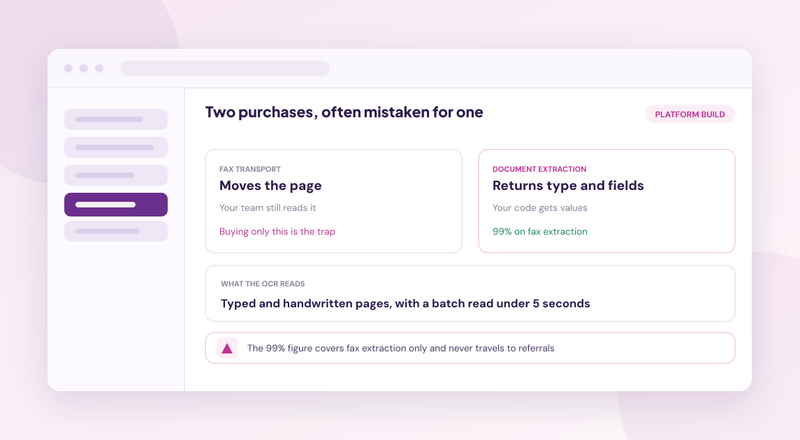
Medsender publishes 99% accuracy for fax data extraction, and that figure covers fax extraction only. It does not describe referral handling, patient matching or the filing step, and it should never be quoted as though it did. Read the figure alongside the exception rule, because the pages outside it are flagged for the coordinator rather than filed on a guess, which is what makes the remainder safe to live with.
Extraction is the step that pulls fields off the page, which is a narrower job than deciding where a document belongs. Accuracy on that step says nothing about whether the right patient was chosen, and no filing accuracy rate is published anywhere. Ask for the scope of any accuracy number a vendor quotes, in the same sentence as the number itself.
What Does Filing Faxes to the Chart Cost Per Page?
Medsender publishes fax at $0.08 per page at low volume, sliding to $0.056 per page at higher volume. A free trial exists and is basic non-AI fax only, with no referral processing and no integration with your EHR, so it does not exercise the filing question at all. Volume tiers between and beyond those two published points are not stated publicly, so ask for your own band in writing before signature.
A per-page rate means the fax inbox cost tracks volume rather than headcount, which is the comparison to run against what the print-and-scan loop costs in staff time today. Trial length is not stated here, so treat the free trial as a look at the queue rather than a test of the filing step.
What Still Has to Be Done by a Person?
A person still handles judgment calls, exceptions, and the filing step wherever the integration cannot take the document, because chart creation and write-back happen if your EHR supports them. Ozark Dermatology, at 5 locations and 14 providers handling 250 faxes a day, reclaimed 40 staff hours a week and reports same-day first contact. Florida Gulf Coast ENT, running on ModMed EMA at up to 25,000 fax pages a month, reports a 92% reduction in triage work and went from three full-time staff to one and a half.
The two practices above counted different things, so neither number transfers to another office without checking the inputs. Volume, specialty mix and how many locations share one fax inbox all move the result. Count your own exceptions for two weeks before setting an expectation with the front office.
Related Reading
Four related pages cover the questions that sit next to this one, including how the Health Insurance Portability and Accountability Act (HIPAA) applies to a fax service.

Zain Qayyum
Co-Founder and Co-CEO
Zain Qayyum is co-founder and co-CEO of Medsender. His work centres on the front-office problems that decide whether a referred patient is ever seen: inbound fax, referral backlogs, and phones nobody has time to answer. He argues that healthcare's hardest problems are operational rather than technical, and speaks and writes on where AI genuinely helps a practice and where it overpromises. He is based in New York.
Related Signals