Referral Automation That Works With Your EHR
 Zain QayyumLast Updated: Nov 23, 2026
Referral Automation That Works With Your EHRMedsender reads an incoming referral, works out what it is, and routes anything unusual to your referral coordinator. Chart creation and write-back happen if your EHR supports them. Where your electronic health record (EHR) does not support them, intake, classification and outreach still run and the filing step stays manual.
Every vendor in this category publishes a page of EHR logos. Very few say what the integration actually does once a referral arrives, which is the question a medical records manager is really asking before signing anything.
TL;DR
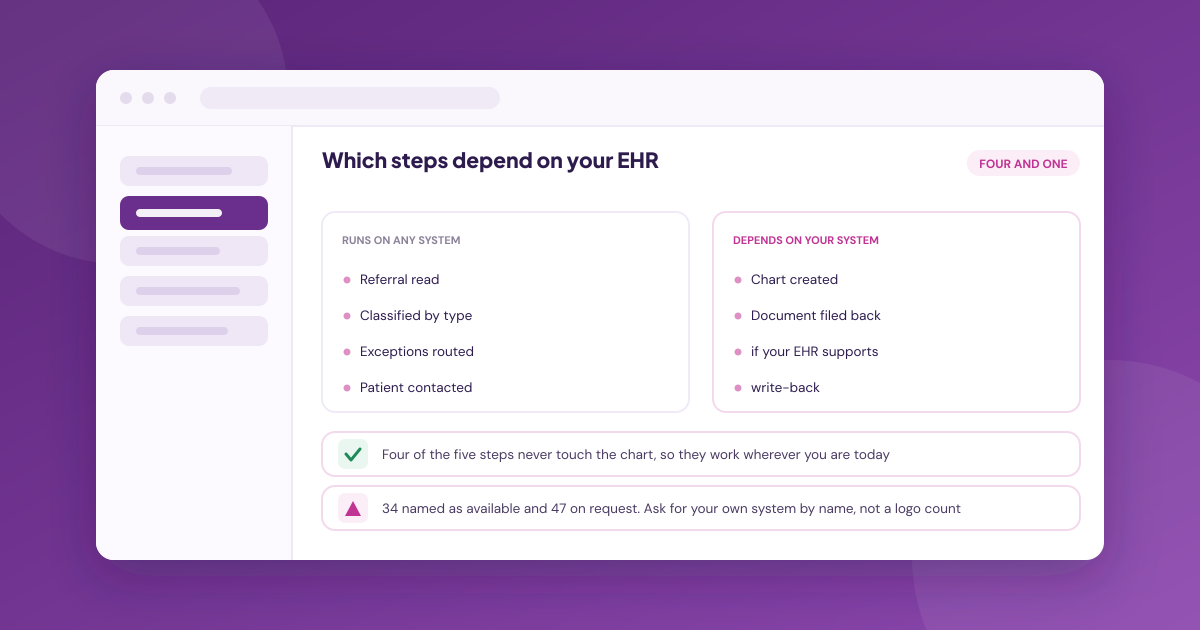
- Referral automation reads the referral, classifies it, routes exceptions and contacts the patient, and none of those four steps depends on your EHR.
- One step alone depends on the system you run, because chart creation and write-back happen if your EHR supports them.
- Medsender names 34 EHR integrations as available and 47 more on request, so ask for your own system by name rather than counting logos.
- ModMed EMA is a named integration, and Medsender is listed on the ModMed Marketplace.
- athenahealth is a named integration with a page of its own.
- An EHR without that support still leaves intake, classification, outreach and exception routing running, with the filing step done by a person.
How Referral Automation Works in Your EHR
Five steps run on every referral, and only the last of them touches your EHR at all. Reading the table from the bottom up is the fastest way to work out what a given practice will actually get.
| Step | What happens | Needs the EHR? |
|---|---|---|
| Referral arrives | read and classified | No |
| Routed | to the right queue or person | No |
| Exception raised | anything unusual flagged for the coordinator | No |
| Patient contacted | text and email with a self-booking link | No |
| Chart created or updated | happens if your EHR supports chart creation and write-back | Yes |
The bottom row carries the whole decision. Four steps run identically whatever you use, and the fifth is conditional, so the question to put to any vendor is which row it is quoting when it says the work is finished.
What Happens in a Supported EHR
Supported systems get the filing step as well as the reading step, which is where the staff hours actually go. Two integrations are worth describing in detail because they come up most often in specialty practices, and the rest of the list follows the same pattern.
Referral Automation and ModMed EMA
ModMed EMA is a named integration, and Medsender is listed on the ModMed Marketplace. Florida Gulf Coast ENT, an ear, nose and throat (ENT) group, runs on ModMed EMA and is one of the published case studies behind this page. Practices already committed to ModMed modules can run both, so the evaluation is about which queue your coordinator works in rather than a replacement decision.
Referral Automation and athenahealth
athenahealth is a named integration with its own page, which matters because referral software lives or dies on writing into one specific system. Ask for a reference practice running athenahealth at a volume close to yours, and ask what the integration sends back as well as what it reads. Examples from an athenahealth practice need their own source rather than being borrowed from a case study on a different system.
The Rest of the Integration List
Medsender names 34 EHR integrations as available with 47 more on request, which is a specific number you can test against your own system. A logo on an integrations page is not the same thing as a named integration with a page behind it, so give your vendor the exact product and version you run. If the answer is that yours is available on request, ask what on request means in practice and who does the work.
What Happens When Your EHR Does Not Support Write-Back
Chart creation and write-back happen if your EHR supports them, and plenty of systems do not. Everything in this section describes that case, because it is the one no vendor in the category writes down and the one a records manager discovers in week one either way.
What Keeps Working
Intake, classification, routing, exception handling and patient outreach all continue, because none of those five steps touches your EHR. The fax inbox is read, a referral is told apart from a result and from an authorization, anything unusual is flagged as an exception for the coordinator, and the patient gets text and email carrying a self-booking link. Judgment calls stay with your team throughout.
What Becomes Manual
Filing is the step that comes back to a person. Somebody opens the chart, enters the referral and posts the outcome, which is the work a supported integration removes. Budget the minutes per referral honestly, multiply by monthly volume, and compare that against what the automation gives back on the other four steps. Our automation without an EHR task list sets out how to run that split deliberately.
Who This Is For
Three profiles are the usual fit for this, and all three share one trait, a document-led intake process rather than a phone-led one.
- Specialty practices receiving referrals by fax and portal
- Groups where one coordinator handles intake for several providers
- Practices on a named integration, or willing to file by hand, since chart creation and write-back happen if your EHR supports them and not every system does
Who This Is Not For
Four cases are poor fits, and saying so early saves a procurement cycle. Each of the four comes up in demos, so they are worth stating rather than discovering.
- Practices needing prior authorization automated, which Medsender does not do and never presents as a shipped capability
- Practices needing insurance verification as a shipped feature, which Medsender never presents as generally available
- Practices on an EHR with no application programming interface (API) and no appetite for a manual filing step
- Anyone needing a contractual uptime commitment, because Medsender publishes no service level agreement
Outcomes, and Which Practice Reported Each One
Three practices have published results on this, and each figure belongs to the practice that reported it rather than to a category average. Volumes and specialties differ, so read the profile beside the number.
- Florida Gulf Coast ENT, on ModMed EMA, handling up to 25,000 fax pages a month, reports a 92% reduction in triage work and a move from three full-time staff to one and a half
- Piedmont Plastic Surgery and Dermatology, 10 locations and 50 providers, reports 50% of referred patients scheduled within minutes after outreach by text and email carrying a self-booking link
- A 110-location group with 325 providers reports referral conversion moving from 20% to 62%
Compare those against your own baseline before accepting any of them as a target. Our comparison of how fax and referral software integrates with EHRs covers the integration question across vendors, connecting fax and referral software to your EHR covers the mechanics, and what referral leakage is covers how to measure the gap you are trying to close.
FAQs
Common questions from administrators and medical records managers evaluating referral automation against their own system.
Does Referral Automation Work With ModMed EMA?
Yes. ModMed EMA is a named integration and Medsender is listed on the ModMed Marketplace. ModMed EMA is also one of the systems where chart creation and write-back happen if your EHR supports them. Florida Gulf Coast ENT runs on ModMed EMA and is one of the published case studies behind this page.
Does Referral Automation Integrate With athenahealth?
Yes. athenahealth is a named integration with its own page. Ask for a reference practice on athenahealth at a comparable referral volume, and ask specifically what the integration returns as well as what it reads, because those two answers can differ considerably between systems on the same named list.
Which Referral Tools Write Back to the Patient Chart, and When?
Writing back depends on the receiving system rather than on the referral tool. For Medsender, chart creation and write-back happen if your EHR supports them. Put your exact system and version to every vendor on your shortlist, and treat a logo strip as a prompt for that question rather than an answer to it.
What Happens If My EHR Does Not Support Chart Creation and Write-Back?
Chart creation and write-back happen if your EHR supports them, so filing stays with your team where it does not. Intake, classification, routing, exception handling and patient outreach all keep running, because none of those five depends on the EHR. Price the manual filing minutes into the decision rather than after it.
How Many EHR Integrations Are Available?
Medsender names 34 integrations as available and 47 more on request. Counting is less useful than naming, so give your vendor the exact product you run and ask whether it sits in the first group or the second. For anything on request, ask what the work involves and who performs it.
Does Referral Automation Replace Our Referral Coordinator?
No. Anything unusual is flagged as an exception for the referral coordinator, and judgment calls stay with your team. What changes is the mix of work, with reading, sorting and chasing handled automatically and the coordinator spending their time on the cases that genuinely need a decision from a person.

Zain Qayyum
Co-Founder and Co-CEO
Zain Qayyum is co-founder and co-CEO of Medsender. His work centres on the front-office problems that decide whether a referred patient is ever seen: inbound fax, referral backlogs, and phones nobody has time to answer. He argues that healthcare's hardest problems are operational rather than technical, and speaks and writes on where AI genuinely helps a practice and where it overpromises. He is based in New York.
Related Signals