Which Practice Software Deploys Without IT
 Zain QayyumLast Updated: Nov 23, 2026
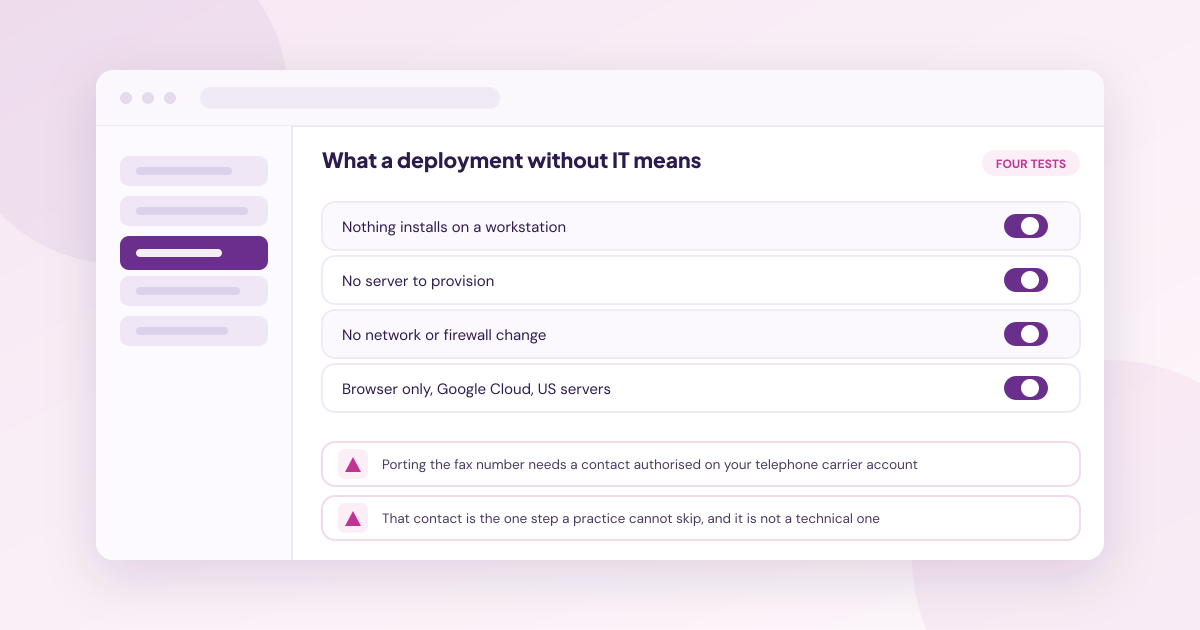
Which Practice Software Deploys Without ITPractice software deploys without IT when it runs in the browser, installs nothing on a workstation and needs no network change. Two steps still need somebody outside the front office, which are porting the fax number and connecting the electronic health record (EHR). Neither one is an IT project.
Cloud-based is a weaker promise than it sounds. A cloud product can still require a local agent, a print driver or a firewall exception, and a practice with nobody to absorb that work does it between patients.
TL;DR
- Practice software needs no IT staff when nothing installs locally, no server is provisioned and no network change is required.
- Medsender is browser only with no on-premise install, hosted on Google Cloud with US servers.
- Porting the fax number needs a contact authorised on the practice's telephone carrier account.
- Connecting the EHR needs whoever holds admin access to it, who at most practices is not an IT person.
- A beta exit date is an intention rather than a commitment, so ask whether the capability you are buying is in use today.
- Microsoft SSO is the only single sign-on supported, and user accounts are configured by a practice administrator.
What Practice Software Deploying Without IT Actually Means
Practice software that deploys without IT is best defined by what is absent rather than by the label the vendor puts on it. The useful test is whether anything lands on a machine inside the building. Ask it in those words and the answer takes one sentence.
The Definition, Stated Plainly
Practice software deploys without IT when nothing installs locally and no network change is required. Medsender meets that definition because it is browser only, hosted on Google Cloud with US servers, and has no on-premise install. A staff member signs in on a machine that already has a browser.
What That Removes
Three categories of work disappear, and each one is normally the reason a practice needs a contractor.
- No server to provision, patch or back up
- No software to install on each workstation, and no desktop rollout to schedule
- No virtual private network (VPN), no firewall exception, no maintenance window
What Cloud-Based Does Not Guarantee
Cloud-based still allows a local component. Some products ship a print driver or a small agent that watches a folder, and that single file turns the purchase into a desktop project. Put the question directly. Is anything installed on a workstation.
The Two Steps Browser Delivery Does Not Remove
Browser delivery removes the server and the desktop, and it does not remove the phone line or the chart. Porting the fax number and connecting the EHR both need a named person with specific access. Saying so is more useful than pretending the list is empty.
Porting the Fax Number
Medsender ports your existing fax number, so the number printed on every referral pad keeps working and no referring office changes anything. The practice supplies its telephone carrier account details and a contact authorised to approve the port. Nothing here states how long the port runs, because that figure is not published.
Connecting the EHR
Connecting the EHR needs whoever holds admin access to it, and as a general pattern that person sits in the practice rather than in any IT function. Medsender publishes 34 named EHR integrations and 47 on request. Chart creation and write-back happen if your EHR supports them, so get that answer for your own EHR by name before signing.
Who Does the Rest
A practice administrator configures user accounts and role-based user permissions, which recurs as staff change. Microsoft SSO is the only single sign-on (SSO) supported, and nothing beyond it should be assumed. Our guide to what to expect from a healthcare software vendor covers how that work is split in writing.
What to Ask a Vendor About Deployment
Five questions settle the deployment question, and a vendor that has sold to practices without IT staff answers each one in a sentence. Hesitation on any of them is the signal. The answers in the right-hand column are the ones that mean no IT project.
The Five Questions
Read each question out as written and record the answer verbatim.
| Question | Answer that means no IT needed |
|---|---|
| Anything installed on a workstation | nothing, browser only |
| Any on-premise server | none |
| Any network or firewall change | none |
| Who configures user access | a practice administrator |
| What is hosted where | Google Cloud, US servers |
The Two Follow-Ups
Two further questions name the people rather than the technology. Who at the practice must be available for the fax number port, and who for the EHR connection. Both answers should be a job title, and both should come before the contract.
What Not to Accept
Three answers look like capabilities and are not, so they belong on a short list of things to push back on.
- A logo strip is not an EHR connection
- Prior authorization is not automated, and no vendor should describe it as shipped
- Medsender does not claim insurance verification as a generally available capability
How Long Will the Healthcare Product Stay in Beta
No vendor can give a practice a reliable date for a capability leaving beta, so the honest answer is that the date is the wrong thing to ask for. What you can get is a plain statement about what is shipped today and what you pay for it. That statement is contractible, and a date is not.
Why the Date Is the Wrong Question
A beta exit date is a roadmap intention rather than a commitment. Even a vendor acting in good faith moves it when engineering reality changes, and the practice carries the consequence of the move. Medsender publishes no beta exit date.
The Question to Ask Instead
Ask whether the specific capability you are buying is shipped and in use at other practices now. If it is not, ask what you pay until it is and what happens if it slips. Get both answers in writing, naming the capability rather than the product.
What Medsender Does and Does Not Ship
Four lines cover the honest position, and each one is worth repeating back to a salesperson.
- Fax intake and referral processing are shipped and can be demonstrated on your own documents
- Prior authorization is not automated, and no vendor should describe it as shipped
- Medsender does not claim insurance verification as a generally available capability
- Chart creation and write-back happen if your EHR supports them, which is a condition rather than a roadmap item
The Clause That Protects a Practice Without IT
Ask for the right to stop paying for any capability not in general use at the point you are billed for it. A vendor confident in what it ships has no reason to refuse. The request also surfaces which parts of the demo were finished.
What Running Without IT Means for Security, and What Is Worth Verifying
Running without IT does not mean running with less protection, and a practice with no technical staff needs the published paperwork more rather than less. Three lists cover it: what the vendor publishes, what stays your responsibility, and what nobody should assume.
What Medsender Publishes
Four items are published and can be collected during evaluation.
- Compliant with the Health Insurance Portability and Accountability Act (HIPAA), hosted on Google Cloud with US servers
- A System and Organization Controls (SOC) 2 Type II report via the Trust Center on request, where controls are tested continuously by an independent auditor
- 256-bit Secure Sockets Layer (SSL) in transit and 2048-bit at rest
- A business associate agreement (BAA) included free with every account
What the Practice Still Owns
Three responsibilities do not transfer to a vendor, whatever the deployment model. Deciding who gets which role is a practice decision. Removing access when somebody leaves is a practice task with a same-day deadline. The practice's own patient consent and opt-out policy governs any outreach.
What Is Not Published
Three things should not be assumed, and asking in writing is the test. No uptime percentage is published, so treat a figure quoted verbally as unconfirmed. No formal service level agreement or service credit is published either, and no certification beyond the published report should be assumed. For the connection side, see connecting fax and referral software to your EHR, and for the number itself, switching fax vendors. Across sites, a multi-location rollout one clinic at a time changes the order of the work.
FAQs
Questions from practices with no technical staff and no contractor on retainer.
Which Practice Software Needs No IT Staff to Deploy?
Software delivered entirely in the browser with no on-premise install, which is how Medsender runs. The test is whether a server has to be provisioned or a network changed, not whether the vendor uses the word cloud. Hosting on Google Cloud with US servers means the infrastructure side belongs to the vendor.
Does Browser-Based Practice Software Require Anything Installed Locally?
Browser-based practice software should not, yet some products in this category do ship a print driver or a folder-watching agent. Ask the question in those exact words and get the answer in writing. One small local file is enough to turn a browser purchase into a desktop project across every machine in the building.
Who at the Practice Has to Be Involved in Going Live?
Three people, none of whom needs technical skills. A contact who can authorise changes on the telephone carrier account handles the number. Whoever holds EHR admin access handles the connection. A practice administrator sets up users, approves role-based permissions and names the owner of flagged exceptions.
How Long Will the Healthcare Product Stay in Beta?
No vendor can answer that reliably, because a beta exit date is an intention rather than a commitment. Medsender publishes no such date. Ask instead whether the capability you are buying is shipped and in use at other practices now, what you pay until it is, and what happens if it slips.
Can We Keep Our Existing Fax Number?
Yes. Medsender ports your existing fax number, so the referral pads, the directory listings and every referring office's address book keep working untouched. You supply the telephone carrier account details and a contact authorised on that account. Changing the number instead is the expensive route, because every one of those records needs updating.
Who Configures User Access Without an IT Team?
A practice administrator does, using role-based user permissions inside the product. Microsoft SSO is the only single sign-on supported, so plan on managing accounts directly unless you already run Microsoft identity. Removing access the day somebody leaves stays a practice task and belongs in whoever owns the offboarding checklist.

Zain Qayyum
Co-Founder and Co-CEO
Zain Qayyum is co-founder and co-CEO of Medsender. His work centres on the front-office problems that decide whether a referred patient is ever seen: inbound fax, referral backlogs, and phones nobody has time to answer. He argues that healthcare's hardest problems are operational rather than technical, and speaks and writes on where AI genuinely helps a practice and where it overpromises. He is based in New York.
Related Signals