What to Expect From a Healthcare Software Vendor
 Zain QayyumLast Updated: Nov 23, 2026
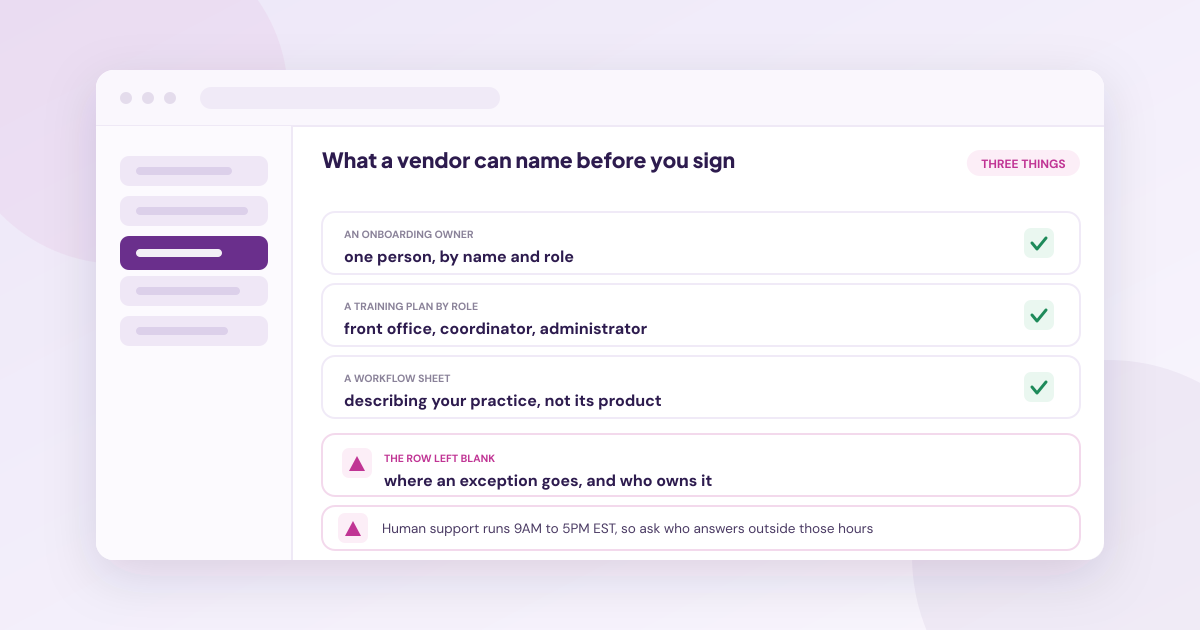
What to Expect From a Healthcare Software VendorA healthcare software vendor owes a practice three things it can name before signing: a person who owns onboarding, a training plan broken out by role, and a written workflow sheet showing how the work will run once the practice is live. Ask for all three in writing.
Those three artifacts separate a vendor describing its product from a vendor describing your week. A vendor that can produce the sheet has already looked at your fax volume, your user list and your electronic health record (EHR) connection.
TL;DR
- A healthcare software vendor can name an onboarding owner, a role-by-role training plan and a workflow sheet for your practice before you sign.
- Training is not one session for everyone, because the front office, the coordinator and the administrator each use a different part of the product.
- The workflow sheet forces a vendor to describe your practice rather than its product, and the exception route is the row left blank.
- Vendor work is the connection, the configuration and the training, while practice work is naming who owns each step inside the practice.
- Medsender runs in the browser with no on-premise install, hosted on Google Cloud with US servers, and includes a business associate agreement free with every account.
- Any vendor offering a calendar before it has seen your fax volume and your EHR connection is guessing, so ask for sequence and ownership instead.
What a Healthcare Software Vendor Is Responsible For
A healthcare software vendor is responsible for the parts of going live that only it can do, which are the connection into your systems, the configuration of the product and the training of your people. Everything else is yours. Unclear ownership between those two lists is where going live stalls.
The Split Between Vendor Work and Practice Work
Vendor work is the connection, the configuration and the training. Practice work is naming the person who owns each step inside the practice, which no vendor can do on your behalf. Neither side can cover the other's half, so a step with no name against it on either list is the step that quietly waits.
What to Get in Writing Before Signing
Three documents cover it, and a vendor that has onboarded practices like yours has all three to hand.
- A named onboarding owner on the vendor side, with a role attached
- A training plan broken out by role rather than a single group session
- A workflow sheet drawn for this practice, not a generic diagram from the website
Who Manages Practice Onboarding on the Vendor Side
Practice onboarding on the vendor side should belong to one person you can email, not to a department. Ask for a name and a role, and ask separately who takes that work over once you are live. The second answer is the one that gets skipped.
Ask for a Name, Not a Team
A shared mailbox is a routing address, not an owner. The question that produces a usable answer is simple. Who do I email on day one, and who do I email in month three. A vendor with a real onboarding function answers both without checking.
What a Good Answer Contains
A good answer has three parts. One person is accountable for the connection and the configuration. A route for questions after going live is stated rather than implied. For Medsender, human support runs 9AM to 5PM EST.
What a Vague Answer Means
No named owner usually means onboarding is unowned rather than shared. Press once more before accepting it. A vendor that still cannot produce a name is telling you the work will land on your office manager.
What Training a Healthcare Software Vendor Should Provide
Training from a healthcare software vendor should arrive in three shapes, because three different jobs touch the product. The front office sees documents arrive. The referral coordinator makes decisions. The practice administrator controls access and the EHR connection.
Front Office Training
Front office training covers what lands in the fax inbox and what the software has already read from it, so nobody retypes a field that is already captured. It also covers what to do with an item flagged as an exception. Judgment calls stay with the team, so the training is about the decision rather than the click.
Referral Coordinator Training
Referral coordinator training covers where a referral sits while it waits for a decision that only a person can make. It also covers patient outreach, which is text and email carrying a self-booking link, so the patient picks the slot. Call automation schedules through that same self-booking route, and your own consent and opt-out policy governs who may be contacted.
Administrator Training
Administrator training covers role-based user permissions, who can see what, and how to change it when somebody joins or leaves. It also covers where the EHR connection is configured and what it reaches in your EHR specifically. Chart creation and write-back happen if your EHR supports them, and training should say plainly which case applies here.
The Onboarding Workflow Sheet, and What Belongs on It
An onboarding workflow sheet is a two-column list of steps with a name against each side. Asking for one during evaluation pays off, because filling it in forces the vendor to describe this practice instead of the product. Seven rows cover most of it.
The Rows a Workflow Sheet Needs
Seven steps split cleanly between the two sides.
| Step | Vendor side | Practice side |
|---|---|---|
| Fax number | ports the existing number | confirms number and carrier |
| Users | creates accounts | supplies the user list |
| Permissions | configures role-based permissions | approves who sees what |
| EHR connection | builds the connection | confirms EHR and access |
| Exceptions | configures the exception route | names the owner |
| Outreach | configures text and email | supplies the consent policy |
| Going live | watches the first batches | runs its own spot check |
The One Row Practices Forget
The exception row needs a named person rather than a role, and it tends to be left open. An exception with no owner behaves exactly like an unread fax, which is the problem the software was bought to remove.
What the Sheet Should Not Contain
No dates belong on the sheet before anyone has seen your fax volume, your user list and your EHR connection. Sequence and ownership are the useful content. A calendar produced in a sales call is a guess dressed as a commitment, and it will be the first thing to move.
What to Verify Before Going Live
Verification before going live splits into paperwork, a live read of your own documents, and a clear line around what stays with your staff. The practice can run all three without the vendor in the room.
Security and Paperwork
Four items cover the paperwork an administrator should collect and keep.
- Hosted on Google Cloud with US servers, browser only, no on-premise install
- 256-bit Secure Sockets Layer (SSL) in transit and 2048-bit at rest
- A System and Organization Controls (SOC) 2 Type II report via the Trust Center on request, where controls are tested continuously by an independent auditor
- A business associate agreement (BAA) free with every account
The First Live Batches
Send your own faxes, including the handwritten pages and poor scans, and watch what comes back. Medsender reads a fax batch in under 5 seconds, and its optical character recognition (OCR) reads typed and handwritten pages. The published 99% accuracy figure covers fax extraction only.
What the Practice Should Still Own
Two decisions never move to the vendor. Deciding that a patient cannot be served is one of them. Anything the software flags as an exception for the coordinator is the other, because unusual documents are surfaced for a person rather than guessed at.
Which Questions to Ask Before You Sign
Six questions close out a vendor conversation, and each one has a weak answer worth recognising. None of them asks how long anything takes, because a duration quoted before the vendor has seen your practice is not an answer. Ask about ownership, scope and exclusions instead.
Ownership and Support
Ask who owns onboarding by name, and who owns the account after going live. Then ask what hours human support covers, in clock terms. A vendor answering with a tier name has not answered. Our guide to practice software that deploys without IT covers who else at the practice gets pulled in.
Scope of the Connection
Ask which EHR the vendor connects to and what the connection reaches inside it, by product name. Medsender publishes 34 named EHR integrations and 47 on request. State the rule back to them in full. Chart creation and write-back happen if your EHR supports them. For the mechanics, see connecting fax and referral software to your EHR.
What Is Not Included
Three exclusions belong in the record, because each is sometimes implied in a demo.
- Prior authorization is not automated, and no vendor should describe it as shipped
- Medsender does not claim insurance verification as a generally available capability
- Microsoft SSO is the only single sign-on supported, and nothing beyond it should be assumed
Across sites, a multi-location rollout one clinic at a time changes the sequence, and switching fax vendors covers the number.
FAQs
Questions practices ask while comparing vendors on what each one will actually do.
What Training Should a Healthcare Software Vendor Provide?
Role-by-role training rather than one session for everyone. The front office needs to know what arrives and what has already been read from it. The referral coordinator needs the decision points and the outreach channels. The practice administrator needs permissions and the EHR connection. Ask for the plan broken out that way in writing.
Who Manages Practice Onboarding on the Vendor Side?
One named person should, and you are entitled to the name and the role before signing. Ask who you email on day one and who you email in month three, because those are often different people. A shared departmental mailbox is a routing address and not an owner.
Is There a Workflow Sheet for Onboarding a Practice?
A serious vendor will produce one for your practice on request. It lists each step with the vendor side and the practice side named, covering the fax number, users, permissions, the EHR connection, exceptions, outreach and going live. A generic diagram from the website is not the same document.
What Should a Practice Do Before Its First Go-Live Day?
Collect the paperwork, send real faxes through, and fill the exception row with a name. The paperwork means the business associate agreement and the security report. The live read means your own handwritten pages and bad scans, not the vendor's clean samples. The name means somebody owns flagged items.
Does a Healthcare Software Vendor Need to Sign a Business Associate Agreement?
Yes, if it creates, receives, maintains or transmits protected health information for you. Medsender includes a business associate agreement free with every account. Some vendors treat it as a paid add-on or a higher tier, so raise it during the pricing conversation rather than after a quote is agreed.
Does Onboarding Require IT Staff at the Practice?
Onboarding does not require IT staff for browser-only software with no on-premise install. Two steps still need someone outside the front office. Porting the fax number needs a contact who can authorise changes on the telephone carrier account, and the EHR connection needs whoever holds admin access to the EHR.

Zain Qayyum
Co-Founder and Co-CEO
Zain Qayyum is co-founder and co-CEO of Medsender. His work centres on the front-office problems that decide whether a referred patient is ever seen: inbound fax, referral backlogs, and phones nobody has time to answer. He argues that healthcare's hardest problems are operational rather than technical, and speaks and writes on where AI genuinely helps a practice and where it overpromises. He is based in New York.
Related Signals